LESSON 01.01 · 20 MIN PRACTICE
Meet your creative workspace
Resolve is a complete post-production environment. Its pages share one project: your edit, visual effects, grade, and sound mix stay connected. Learn the places before learning every button.
Media›Edit›Fusion›Color›Fairlight›Deliver
Conceptual workflow · read from left to right
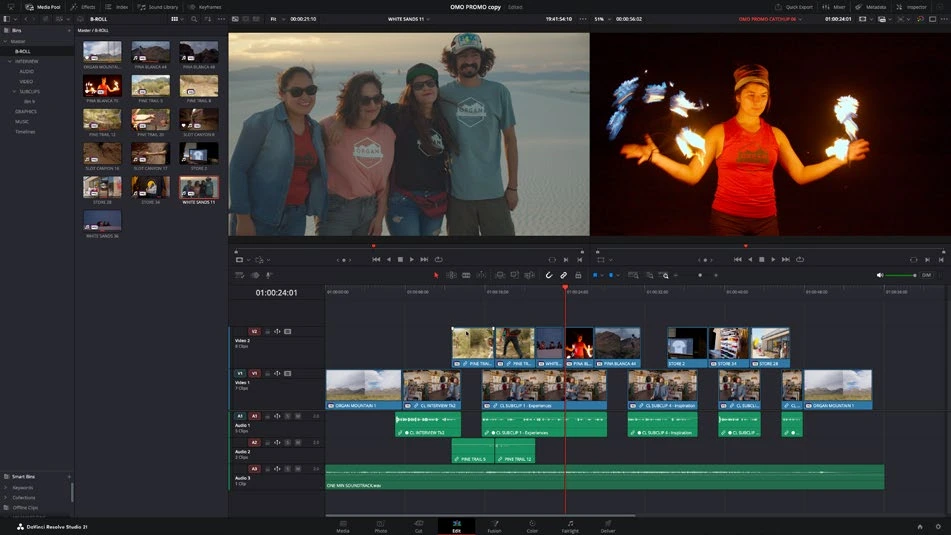
ACTUAL RESOLVE INTERFACEView full size ↗
Work through it
- Open Resolve. In the Project Manager, choose New Project and name it First Film. Open it, then locate the page bar at the bottom of the window.
- Visit Media, Cut, Edit, Fusion, Color, Fairlight, and Deliver. Resolve 21 also includes Photo for still-image work. Return to Edit for your first video project.
- Identify the Media Pool for source clips, the viewer for playback, the timeline for arranging clips, and the Inspector for the selected clip’s controls. Toggle a panel to see how the workspace responds.
- Import one short video using File > Import > Media. Double-click it to preview the source. Drag it into the empty timeline area, then press Space to play and stop.
Your turn
Make a 10-second timeline from any clip you own. Find it on Edit and Color, then return to Edit. Explain which controls belong to the clip and which belong to the project.
QUICK KNOWLEDGE CHECK
What happens when you move from Edit to Color?
Your notes
Write down what worked, what surprised you, and what to try next. Saved on this device.
Original practical lesson · Open the in-house resource shelf for practice files and definitions. Completion records your self-assessment, not certification.