LESSON 04.02 · 35 MIN PRACTICE
Ripple, roll, slip, and slide
Trimming is the grammar of timing. Ripple changes duration and shifts later material. Roll moves a shared boundary. Slip changes the source window inside a clip. Slide moves a clip while trimming its neighbors.
Ripple: duration›Roll: boundary›Slip: source window›Slide: position
Conceptual workflow · read from left to right
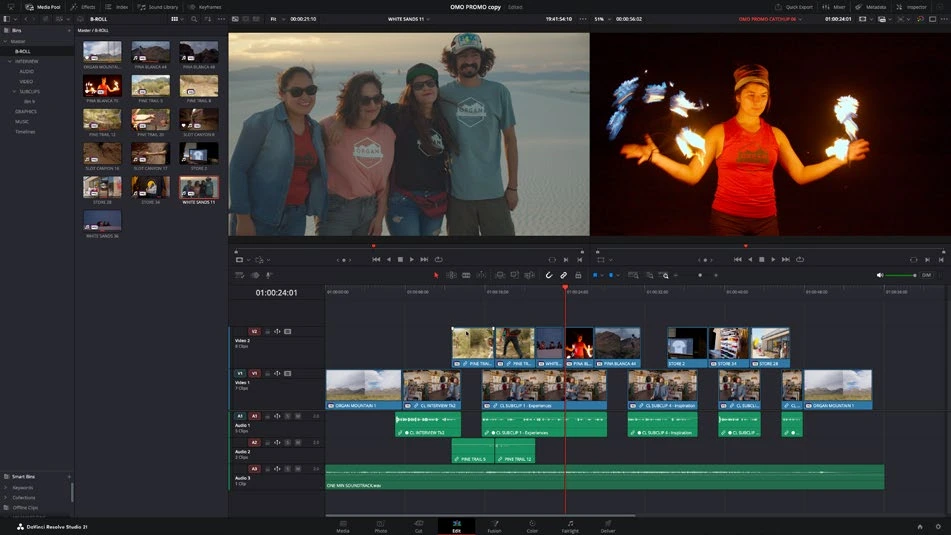
ACTUAL RESOLVE INTERFACEView full size ↗
Work through it
- Arrange three clips with unused handles and duplicate the timeline. Enter Trim Edit mode and hover near edges until the cursor indicates the intended trim.
- Ripple the end of the first clip by a second. Note the new total duration and the movement of later material. Undo.
- Roll the boundary between two clips. The outgoing clip gains what the incoming clip loses, preserving their combined duration. Compare the viewer’s outgoing and incoming frames.
- Slip the middle clip to choose different source frames without moving it in time. Then try a slide operation and inspect both neighbors. Undo between demonstrations.
Your turn
Make one deliberate example of each trim. Record which changes timeline duration, which changes source content, and which changes a clip’s position.
QUICK KNOWLEDGE CHECK
Which operation changes source frames while preserving clip position and duration?
Your notes
Write down what worked, what surprised you, and what to try next. Saved on this device.
Original practical lesson · Open the in-house resource shelf for practice files and definitions. Completion records your self-assessment, not certification.