LESSON 04.04 · 35 MIN PRACTICE
Titles, transforms, keyframes, and easing
Keyframes store parameter values at specific times. Resolve interpolates between them. A useful animation draws attention to content while maintaining readability.
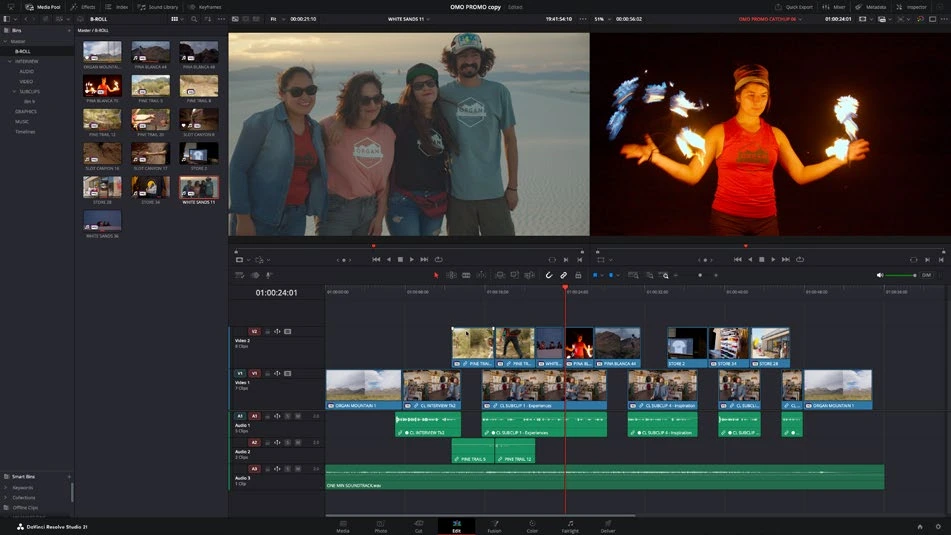
ACTUAL RESOLVE INTERFACEView full size ↗
Work through it
- Add a basic title to V2 over a shot. Use the Inspector to set a clear typeface, readable size, and restrained placement within safe areas.
- Select the title or clip and move the playhead to its start. Enable a keyframe for a transform parameter, such as Position. Move later in time and change that parameter to create a second keyframe.
- Open the available keyframe or curve controls. Compare linear motion with eased motion. Watch the complete entrance at normal speed and reduce movement if it competes with the footage.
- Check the title over the brightest and darkest frames. Add restrained background separation if needed, then preview a phone-sized version of the output.
Your turn
Create a lower third with a name and role. Keep it readable for at least three seconds, with a short eased entrance and no overlap with important faces.
QUICK KNOWLEDGE CHECK
What does a keyframe store?
Your notes
Write down what worked, what surprised you, and what to try next. Saved on this device.
Original practical lesson · Open the in-house resource shelf for practice files and definitions. Completion records your self-assessment, not certification.