Subtitles, readability, and accessible delivery
Subtitles carry language and timing, not just decoration. Their accuracy matters more than animation. A readable subtitle should remain on screen long enough to understand and should not compete with faces or important graphics.
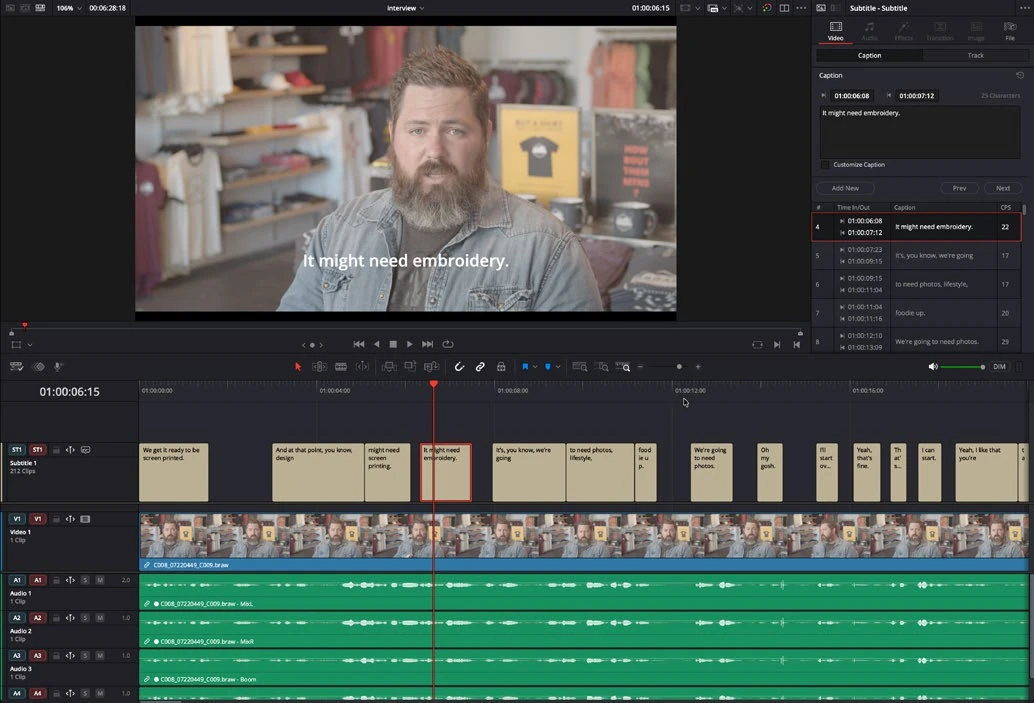
Work through it
- Create a subtitle track on your edit timeline. Enter a short spoken sentence manually and align its start and end with the actual speech.
- Split long text at natural language boundaries. Keep lines concise, proofread names and punctuation, and allow a comfortable reading time instead of rapidly flashing words.
- Set track-level styling consistently, then check placement against lower thirds and variable background brightness. Review at the actual intended viewing size.
- Export a test with subtitles burned in, and a separate subtitle file when your delivery requires one. Reopen the subtitle file or rendered video and verify timing and characters.
Understand the decision
Use a subtitle track for subtitle deliverables. A Text+ graphic may look like a caption, but it does not automatically become a structured subtitle file. Accessibility also includes meaning: important non-speech sounds may need concise descriptions when the audience cannot hear them.
Your turn
Caption 30 seconds of dialogue, including a speaker change. Check every word against the recording and produce the subtitle format your imagined client requested.
What is the difference between burned-in and separate subtitles?
Your notes
Write down what worked, what surprised you, and what to try next. Saved on this device.
Original practical lesson · Open the in-house resource shelf for practice files and definitions. Completion records your self-assessment, not certification.