LESSON 05.04 · 45 MIN PRACTICE
Conform and round-trip without surprises
A conform rebuilds an edit from interchange data such as XML, AAF, or EDL. It is a translation between systems, so not every effect or timing operation survives unchanged.
Edit + reference›Interchange + media›Rebuild›Compare every cut
Conceptual workflow · read from left to right
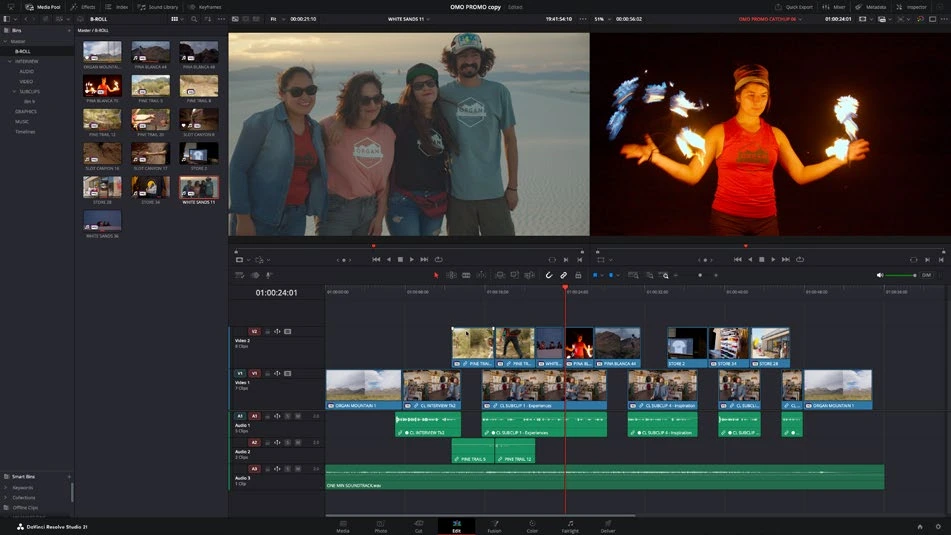
ACTUAL RESOLVE INTERFACEView full size ↗
Work through it
- Prepare a short reference export with visible timecode and clear audio sync. Keep an exported interchange file and a list of the source media supplied for the handoff.
- Import the interchange into a duplicate project and connect camera originals. Compare timeline start timecode, resolution, frame rate, and source reel or filename identity.
- Place the reference export on a comparison track. Check every edit, especially speed changes, nested sequences, transitions, transforms, and mixed-rate clips.
- Rebuild unsupported effects explicitly. Record exceptions in a conform note, and send a short review render before investing in final grading or mixing.
Your turn
Export and reimport a small timeline through an available interchange format. Compare it with the reference and document at least three items you checked, even if no mismatch occurs.
QUICK KNOWLEDGE CHECK
What is the most reliable conform reference?
Your notes
Write down what worked, what surprised you, and what to try next. Saved on this device.
Original practical lesson · Open the in-house resource shelf for practice files and definitions. Completion records your self-assessment, not certification.