LESSON 06.03 · 35 MIN PRACTICE
Primary balance: exposure, contrast, and white balance
Primary corrections affect broad tonal or color relationships. First make the image believable and consistent; then decide how stylized it should become. Evaluate in the correct color-management context.
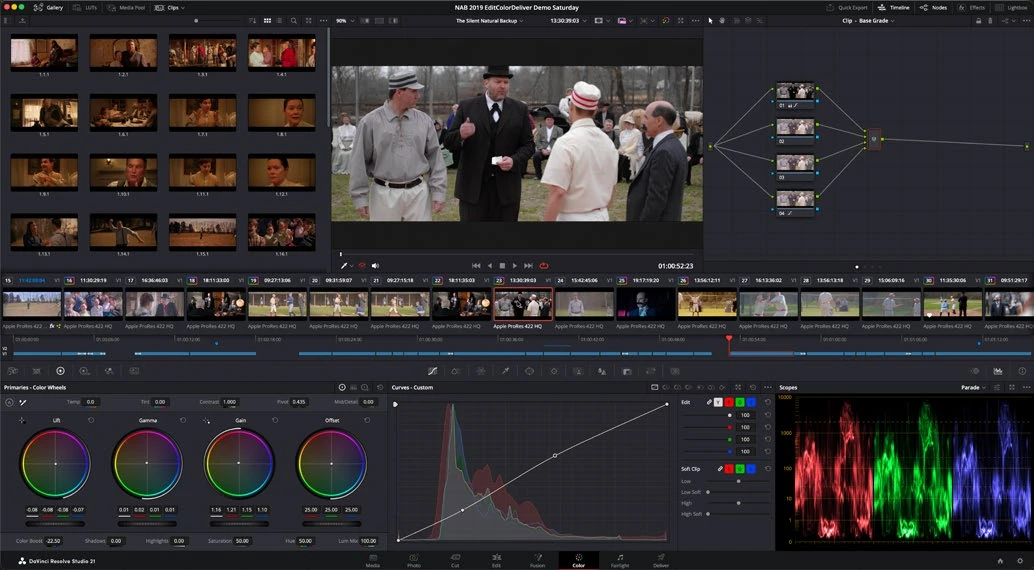
ACTUAL RESOLVE INTERFACEView full size ↗
Work through it
- Choose a representative shot and confirm its input interpretation. A log clip needs the intended color pipeline before you judge it as a finished display image.
- Adjust overall exposure with an appropriate primary control. Establish useful detail in the subject and keep an eye on bright areas that matter to the scene.
- Use temperature, tint, or channel controls to correct an unwanted cast. Compare neutral references under the same light and remember that mixed lighting may need a local correction later.
- Shape contrast and pivot gently. Revisit saturation after contrast because stronger tonal separation can change the perceived intensity of color.
Your turn
Balance three shots of the same subject under different conditions. Keep a before/after still and describe the most important correction in each.
QUICK KNOWLEDGE CHECK
What should usually come before a strong creative look?
Your notes
Write down what worked, what surprised you, and what to try next. Saved on this device.
Original practical lesson · Open the in-house resource shelf for practice files and definitions. Completion records your self-assessment, not certification.