LESSON 06.04 · 40 MIN PRACTICE
Shot matching and a coherent scene
A sequence is judged across cuts, not as isolated stills. Shot matching aligns the relationships that should remain stable while respecting changes in camera angle, light, and composition.
Reference›Exposure›Balance›Color›Sequence review
Conceptual workflow · read from left to right
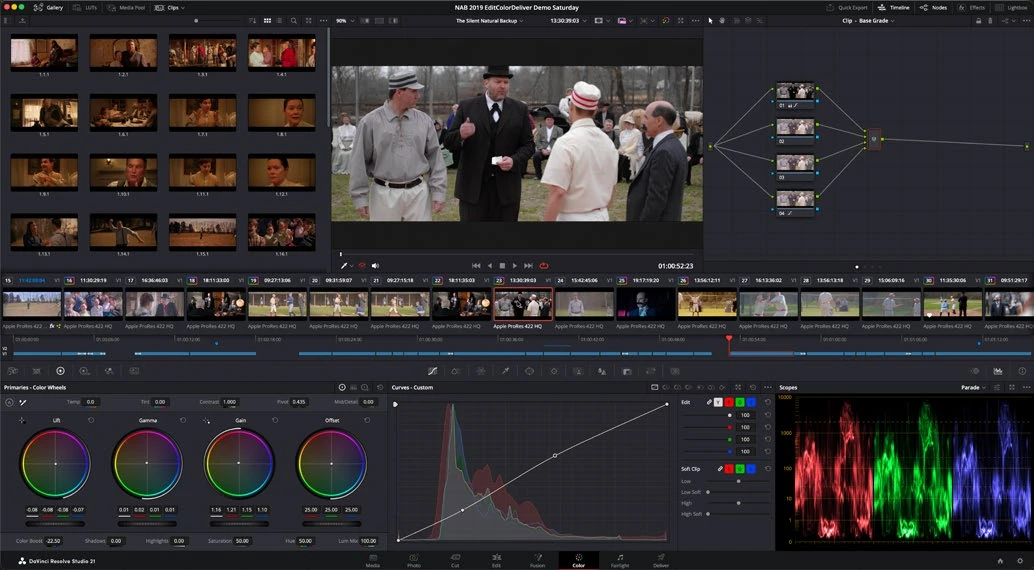
ACTUAL RESOLVE INTERFACEView full size ↗
Work through it
- Choose a reference shot with useful exposure, skin, and environment detail. Save a Gallery still and use a wipe or split-screen comparison to view it beside another shot.
- Match broad exposure and contrast first. Compare the same subject or surface rather than unrelated bright objects at different distances.
- Match color balance and saturation next. Use scopes to verify a suspected cast, then watch the edit at normal speed to judge whether the cut still jumps.
- Check the entire scene after local corrections. A shot that matches one neighbor may become inconsistent with the next; adjust the sequence as a whole.
Your turn
Match five shots into one scene. Export a short version and watch it away from the grading controls. Record the one remaining mismatch you notice most.
QUICK KNOWLEDGE CHECK
What makes a good matching reference?
Your notes
Write down what worked, what surprised you, and what to try next. Saved on this device.
Original practical lesson · Open the in-house resource shelf for practice files and definitions. Completion records your self-assessment, not certification.