LESSON 06.01 · 25 MIN PRACTICE
The Color page and a useful node tree
A color node is a processing step. Serial nodes pass their result from one to the next, so order matters. Clear labels help you understand the grade and revisit it without guessing.
Balance›Contrast›Look›Output
Conceptual workflow · read from left to right
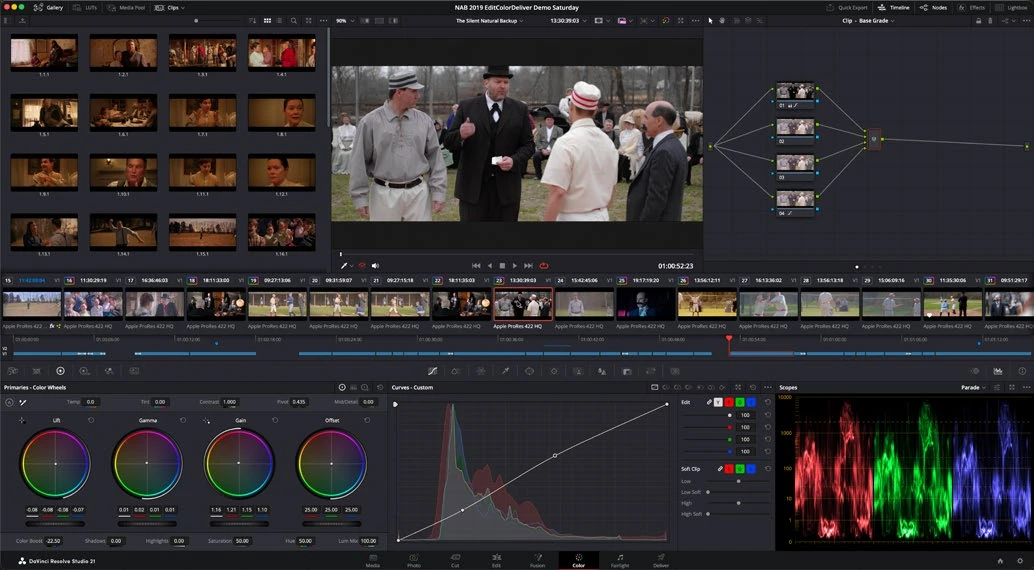
ACTUAL RESOLVE INTERFACEView full size ↗
Work through it
- Open a short timeline on Color. Select a clip and identify the viewer, clip strip, node graph, grading palettes, and scopes. Open the waveform if it is hidden.
- Use a simple serial structure: Balance, Contrast, and Look. Add nodes one at a time and label them. Keep the starting grade deliberately modest.
- Make a small exposure or balance adjustment in the first node, then a contrast adjustment in the second. Bypass individual nodes and notice each contribution.
- Save a Gallery still of the result and compare it with the ungraded image. Avoid confusing a saved still with a rendered media file; it is a reference and can carry grade data.
Your turn
Build and label a three-node grade. Explain what each node does and bypass it to demonstrate the difference.
QUICK KNOWLEDGE CHECK
Why does serial node order matter?
Your notes
Write down what worked, what surprised you, and what to try next. Saved on this device.
Original practical lesson · Open the in-house resource shelf for practice files and definitions. Completion records your self-assessment, not certification.