LESSON 08.02 · 35 MIN PRACTICE
LUTs, gamut mapping, and order of operations
A LUT maps values through a predefined table. Some LUTs are technical transforms; others create a look. Neither automatically knows the actual camera encoding or the intended output display.
ACTUAL RESOLVE INTERFACEView full size ↗
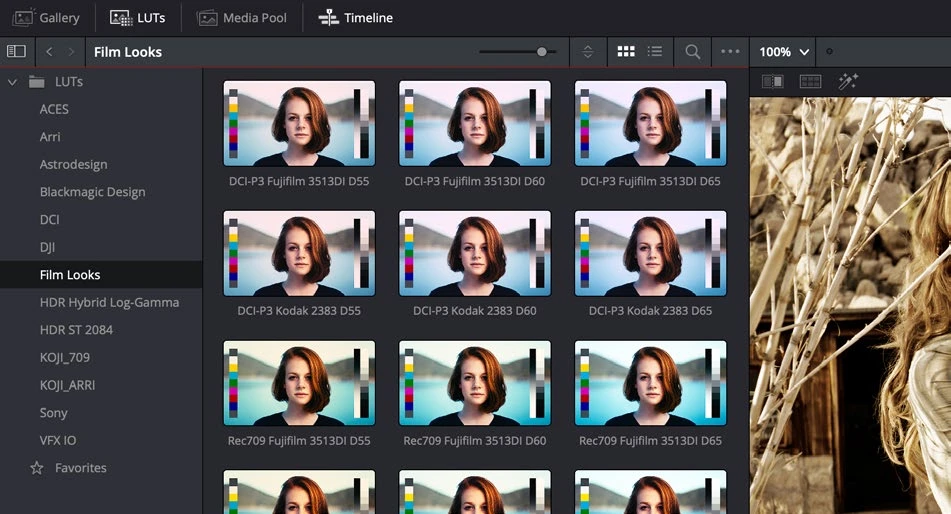
Work through it
- Read the LUT’s documentation and identify its expected input and output. If that information is missing, treat it as an uncertain creative asset rather than a trustworthy technical conversion.
- Apply the LUT in a dedicated node at the appropriate stage of a controlled pipeline. Compare bypassed and active images while watching highlights and saturated colors.
- Place exposure and balance adjustments before or after the LUT deliberately. Test both orders and describe why the response changes.
- Compare a documented transform’s tone and gamut mapping with a simple LUT on bright, saturated material. Preserve the version that keeps necessary detail and meets your intended output.
Your turn
Build two otherwise identical grades with a balance correction on opposite sides of a LUT. Record differences in highlight behavior and saturation.
QUICK KNOWLEDGE CHECK
What must be known before using a technical LUT?
Your notes
Write down what worked, what surprised you, and what to try next. Saved on this device.
Original practical lesson · Open the in-house resource shelf for practice files and definitions. Completion records your self-assessment, not certification.