LESSON 08.04 · 40 MIN PRACTICE
Noise reduction, sharpening, grain, and finishing order
Finishing tools trade one quality for another. Noise reduction may remove detail; sharpening may emphasize artifacts; grain may unify texture. Inspect at realistic size and in motion.
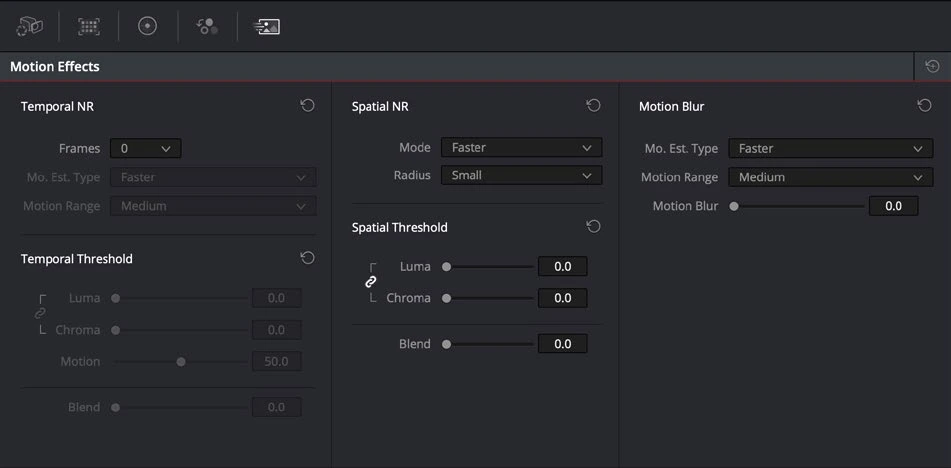
ACTUAL RESOLVE INTERFACEView full size ↗
Work through it
- Choose a noisy shot and create a separate reduction node. In Studio, compare modest temporal and spatial reduction settings using a representative moving section.
- Inspect hair, fabric, moving edges, and fine texture at 100%. Increase settings only until distracting noise is controlled, not until all natural texture disappears.
- Apply sharpening cautiously after judging the actual output resolution. Check high-contrast edges for halos and compression-sensitive detail.
- If using grain, evaluate its size and strength at the final resolution. Render a short sample using the delivery codec because compression may alter or erase subtle texture.
Your turn
Create three exports: untouched texture, moderate cleanup, and deliberately excessive cleanup. Compare motion and detail, then choose and justify the moderate result.
LESS EFFECTIVE
Increase reduction until every frame looks perfectly smooth.
BETTER APPROACH
Preserve useful texture and judge moving footage at delivery size.
QUICK KNOWLEDGE CHECK
What is a warning sign of excessive temporal noise reduction?
Your notes
Write down what worked, what surprised you, and what to try next. Saved on this device.
Original practical lesson · Open the in-house resource shelf for practice files and definitions. Completion records your self-assessment, not certification.