LESSON 13.03 · 35 MIN PRACTICE
Voice Isolation, dialogue tools, and AI Audio Assistant
AI audio tools can help separate or balance material, but aggressive settings may introduce metallic textures, missing consonants, or unstable ambience. Listen to the problem and the side effects together.
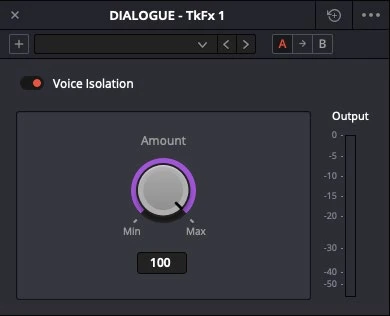
ACTUAL RESOLVE INTERFACEView full size ↗
Work through it
- Select dialogue with a clearly audible noise problem. Save an unprocessed reference and choose a representative section including quiet words and breaths.
- Apply Voice Isolation or the appropriate dialogue tool gently. Compare at matched perceived loudness and listen on headphones for damaged speech texture.
- If using Dialogue Separator or other available separation controls, change one component at a time. Preserve enough room character for the scene to feel believable.
- Run AI Audio Assistant on a duplicate timeline when appropriate. Review its level, routing, and processing decisions, then measure and listen to the complete result rather than treating it as a finished mix.
Your turn
Make two cleanup versions of a short passage: conservative and aggressive. Choose the version that preserves speech best, even if some background remains.
QUICK KNOWLEDGE CHECK
Which result should you prefer?
Your notes
Write down what worked, what surprised you, and what to try next. Saved on this device.
Original practical lesson · Open the in-house resource shelf for practice files and definitions. Completion records your self-assessment, not certification.