LESSON 14.02 · 35 MIN PRACTICE
RAW interpretation, white balance, and highlight detail
A RAW file contains camera sensor-derived information that must be interpreted into a viewable image. Available controls and support depend on the camera format and Resolve version.
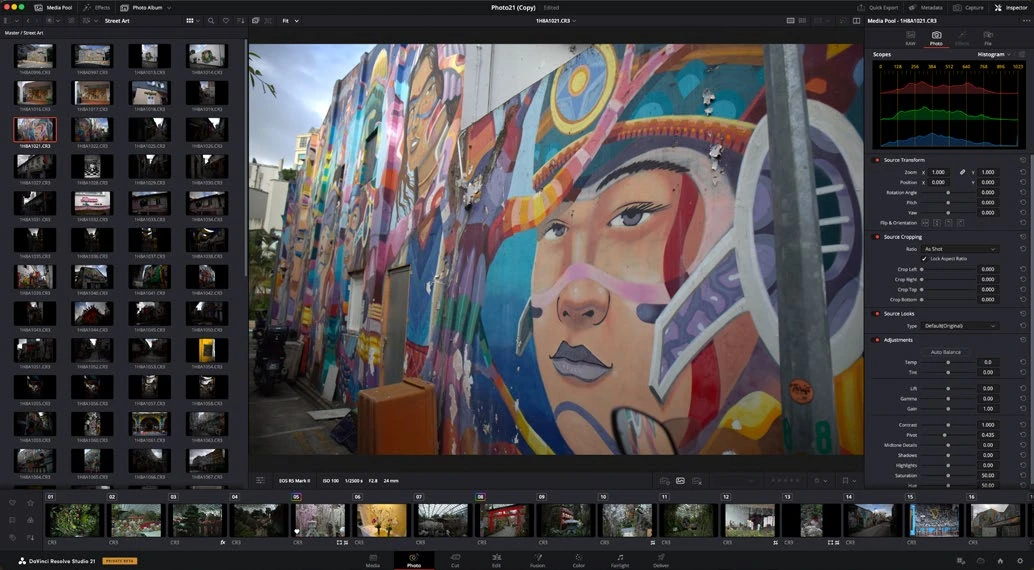
ACTUAL RESOLVE INTERFACEView full size ↗
Work through it
- Import a supported RAW photograph and compare the available source controls with those of a JPEG. Record which adjustments are available for the actual format you have.
- Set a sensible white balance using a known reference and the scene’s intended lighting. Avoid neutralizing purposeful warm or cool illumination.
- Adjust exposure while inspecting important highlights. Determine whether detail exists in the source or whether the bright area was irretrievably clipped during capture.
- Apply a restrained base contrast and check gradients, fine texture, and saturated objects at full size before moving to creative styling.
Your turn
Edit one RAW file and one JPEG of a similar scene. Compare highlight and white-balance flexibility without assuming that every RAW file can recover every mistake.
QUICK KNOWLEDGE CHECK
What determines whether lost highlight detail can be recovered?
Your notes
Write down what worked, what surprised you, and what to try next. Saved on this device.
Original practical lesson · Open the in-house resource shelf for practice files and definitions. Completion records your self-assessment, not certification.