LESSON 14.01 · 30 MIN PRACTICE
Photo page, albums, and source organization
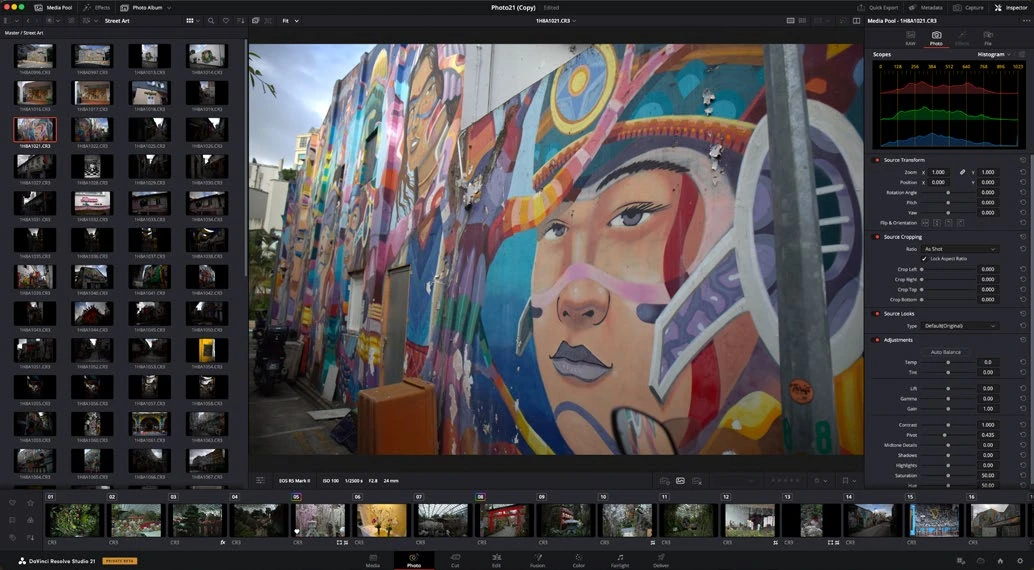
Resolve 21 includes a Photo page for still photography. The goal is to organize images, preserve source information, and apply a consistent editing process without confusing photo and video delivery needs.
ACTUAL RESOLVE INTERFACEView full size ↗
Work through it
- Open Photo in a practice project and locate its image organization and viewing controls. Import a small set of JPEG, TIFF, or supported camera RAW files that you own.
- Organize the images into a meaningful album or collection using the available Photo controls. Separate selects from alternates so review remains focused.
- Inspect image dimensions, orientation, and source information. A still may be much larger than a video timeline and deserves its own crop and export decisions.
- Choose one representative photograph as a reference. Make a small adjustment, then compare it with the unedited source using the available before/after view.
Your turn
Organize six photographs into a coherent mini-series and select three final candidates. Write one sentence explaining the visual connection between them.
QUICK KNOWLEDGE CHECK
Why inspect source dimensions for a photo?
Your notes
Write down what worked, what surprised you, and what to try next. Saved on this device.
Original practical lesson · Open the in-house resource shelf for practice files and definitions. Completion records your self-assessment, not certification.