LESSON 10.01 · 50 MIN PRACTICE
Green screen, spill, and edge integration
Keying separates foreground from a background color. A believable result also requires edge treatment, color integration, and a plausible new environment. Removing green is only one part of the work.
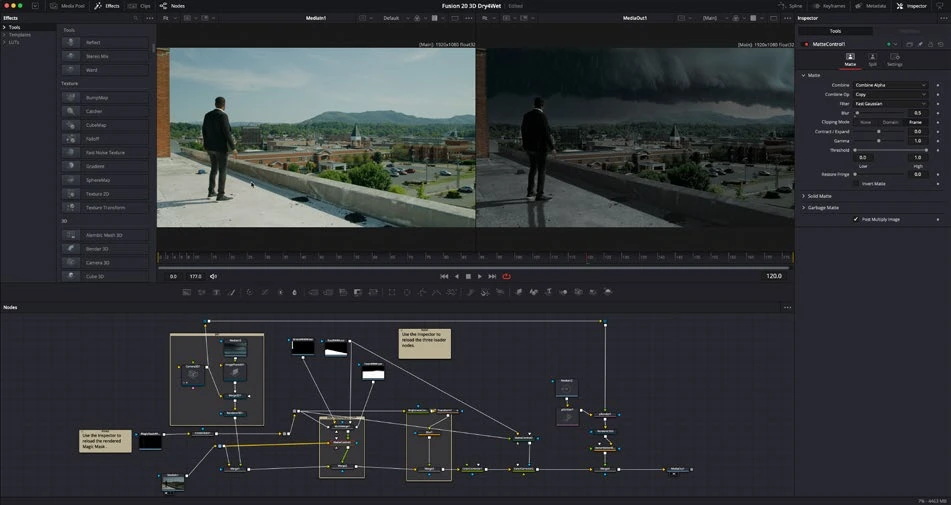
ACTUAL RESOLVE INTERFACEView full size ↗
Work through it
- Use a well-exposed green-screen shot with clean separation where possible. Add an appropriate keyer such as Delta Keyer and sample the backing color.
- Inspect the matte separately. Preserve fine hair and semi-transparent edges while removing unwanted background. Use a garbage mask to exclude areas that never belong to the subject.
- Reduce green spill carefully without making skin or clothing unnaturally gray. Inspect the result against both a neutral background and the intended scene.
- Match light direction, contrast, softness, and texture. Check motion-blurred edges and any transparent objects, then render a short test.
Your turn
Composite a short keyed shot over two different backgrounds. Write down which background integrates more convincingly and why.
QUICK KNOWLEDGE CHECK
Why inspect a key over multiple backgrounds?
Your notes
Write down what worked, what surprised you, and what to try next. Saved on this device.
Original practical lesson · Open the in-house resource shelf for practice files and definitions. Completion records your self-assessment, not certification.