LESSON 11.01 · 25 MIN PRACTICE
Tracks, buses, meters, and the signal path
Audio flows from clips through tracks and buses to an output. Track controls affect a channel strip; bus controls affect a combined signal. Knowing the route makes silence and overload easier to diagnose.
Clip gain›Track processing›Track fader›Bus›Output / monitor
Conceptual workflow · read from left to right
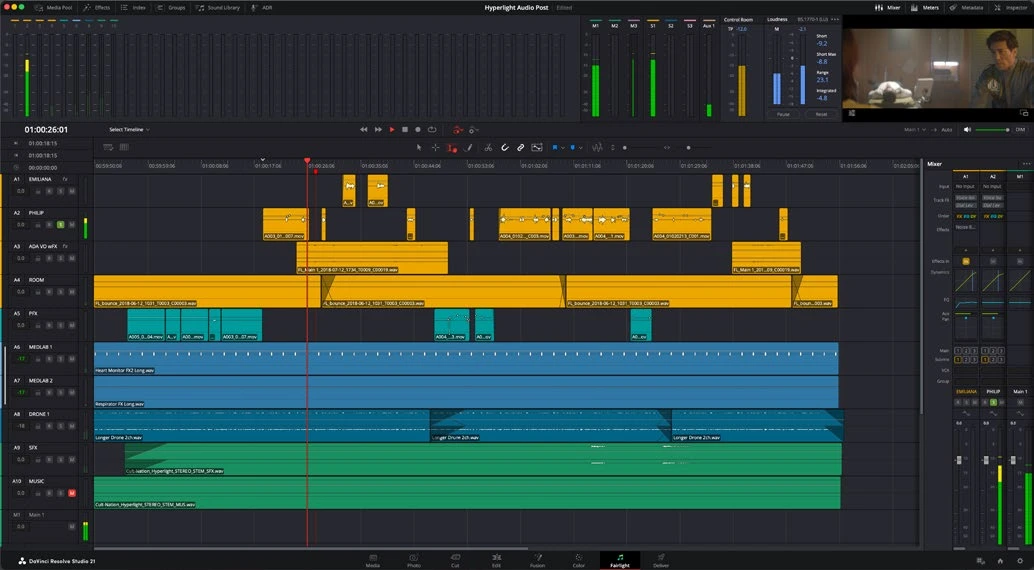
ACTUAL RESOLVE INTERFACEView full size ↗
Work through it
- Open your short edit in Fairlight. Identify the timeline, mixer, meters, and main output bus. Name dialogue, music, and effects tracks clearly.
- Play a dialogue clip and watch both its track meter and the output meter. Mute and solo deliberately, then restore the normal state.
- Inspect bus routing and output assignment. Follow one track to the main bus. Confirm whether your track is mono or stereo and that its source channels are mapped correctly.
- Lower the monitor volume without changing the mix, then compare it with changing the track fader. Learn which control affects listening comfort and which affects the exported balance.
Your turn
Draw the signal path for one dialogue clip and one music clip. Diagnose a deliberately muted track, then restore it.
QUICK KNOWLEDGE CHECK
Which change affects listening volume without necessarily changing the render?
Your notes
Write down what worked, what surprised you, and what to try next. Saved on this device.
Original practical lesson · Open the in-house resource shelf for practice files and definitions. Completion records your self-assessment, not certification.