LESSON 11.04 · 40 MIN PRACTICE
Music, effects, panning, and automation
A mix directs attention. Dialogue normally needs space to remain intelligible, while music and effects supply emotion and environment. Automation changes the balance over time.
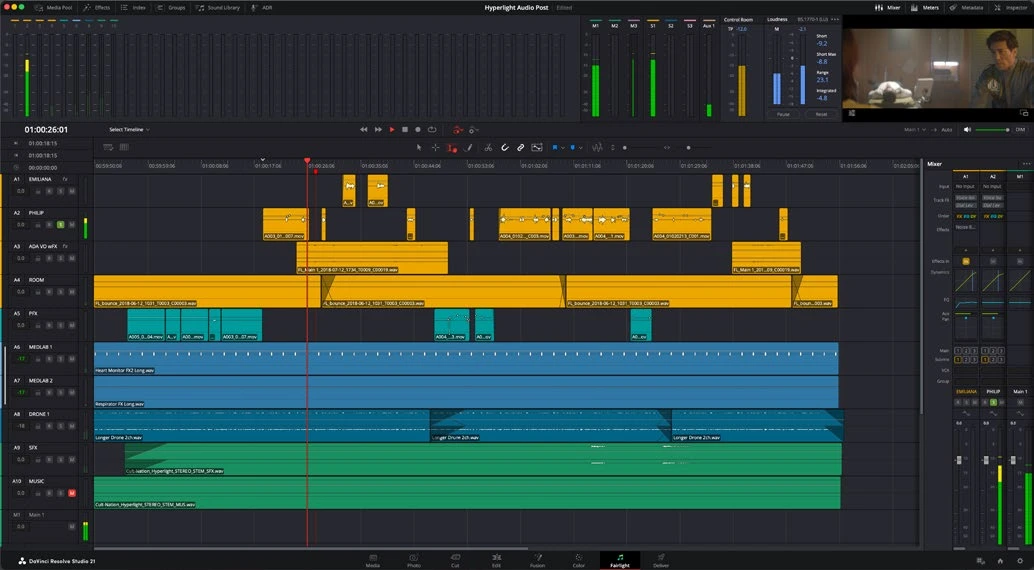
ACTUAL RESOLVE INTERFACEView full size ↗
Work through it
- Place music and effects on separate named tracks. Trim them to the story rather than letting a full-length music file determine the edit.
- Set an initial balance with dialogue clearly understandable. Check quiet words, not only the loudest sentence. Keep effects at a believable perspective.
- Use pan controls to create a deliberate stereo space. Keep essential content compatible with mono playback and avoid moving dialogue arbitrarily across the image.
- Write or draw automation for music dips and scene transitions. Review automation mode before playback so you do not accidentally overwrite a finished pass.
Your turn
Mix a 30-second scene with dialogue, music, and at least two effects. Add one gentle music dip under speech and verify it on both headphones and speakers if available.
QUICK KNOWLEDGE CHECK
What does automation allow?
Your notes
Write down what worked, what surprised you, and what to try next. Saved on this device.
Original practical lesson · Open the in-house resource shelf for practice files and definitions. Completion records your self-assessment, not certification.