← All 100 how-to guidesGUIDE 009 / 100
SETUP & MEDIA
How to enable Live Save and project backups
DaVinci Resolve Studio 21.1 · Original practical guide
Live Save protects recent work, while project backups provide earlier recovery points. Neither is a substitute for copying your original media to separate storage.
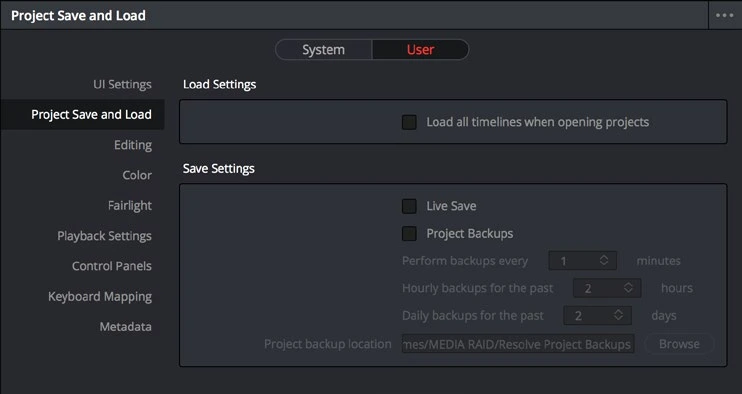
ACTUAL RESOLVE INTERFACEView full size ↗
Step by step
- Open DaVinci Resolve Preferences and find User > Project Save and Load.
- Enable Live Save and Project Backups. Choose backup intervals that suit the work and a reliable backup location.
- Save the preferences, make a small identifiable edit in a practice project, and allow a scheduled backup to occur.
- In Project Manager, inspect that project’s available backups. Confirm you can identify the backup time without replacing the working project.
Check your result
The backup list contains a recent recovery point and the backup folder is on reachable storage.
Technical reference: DaVinci Resolve 21.1 Reference Manual, Blackmagic Design, September 2026. Screenshot page numbers refer to that manual. Independently written guidance; specific controls may vary by platform and build. Authorship & image credits.