← All 100 how-to guidesGUIDE 033 / 100
TITLES & SUBTITLES
How to create a lower-third name caption
DaVinci Resolve Studio 21.1 · Original practical guide
A lower third identifies a speaker without competing with the interview. Prioritize name hierarchy and placement over elaborate motion.
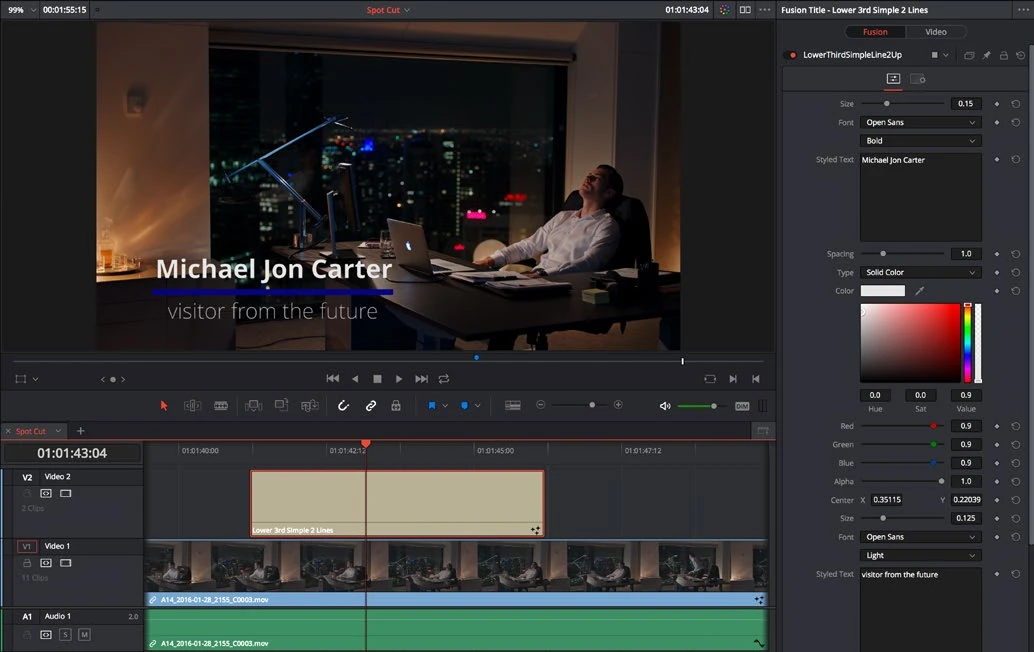
ACTUAL RESOLVE INTERFACEView full size ↗
Step by step
- In the Titles library, choose a lower-third preset or place a Text title over the interview shot.
- Enter the person’s name and role in the appropriate fields. Keep the role shorter and visually less prominent than the name.
- Position the graphic clear of the face and other captions. Check safe areas and compare several shots where it will appear.
- Set a duration long enough to read comfortably. Play its entrance and exit, then duplicate and update the text for additional speakers.
Check your result
Names and roles are accurate, comfortably readable, and consistently placed across the film.
Technical reference: DaVinci Resolve 21.1 Reference Manual, Blackmagic Design, September 2026. Screenshot page numbers refer to that manual. Independently written guidance; specific controls may vary by platform and build. Authorship & image credits.