← All 100 how-to guidesGUIDE 028 / 100
FRAMING & MOTION
How to freeze a frame
DaVinci Resolve Studio 21.1 · Original practical guide
A freeze frame holds one selected image for a chosen duration. Isolate the section you want to freeze so the rest of the action can remain moving.
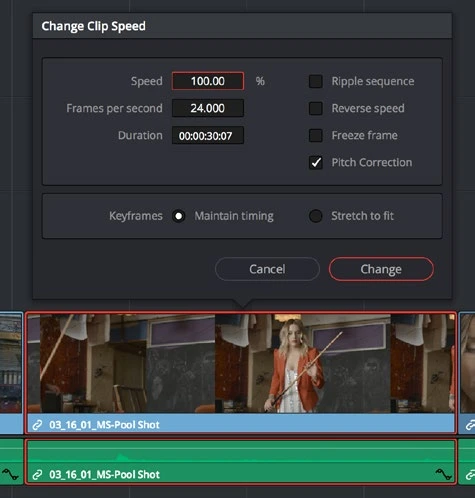
ACTUAL RESOLVE INTERFACEView full size ↗
Step by step
- Place the playhead on the exact image to hold. Step through neighboring frames to avoid motion blur or a blink.
- Split around the section that will become the hold, preserving the moving sections you still need.
- With the playhead on the intended image, choose Clip > Freeze Frame (Shift-R in the default keyboard preset). Adjust the hold duration on the timeline.
- Play into and out of the freeze. Add suitable sound or a subtle transition only if the abrupt stop is not the intended style.
Check your result
The held image is the chosen frame and it lasts exactly as long as the edit requires.
Technical reference: DaVinci Resolve 21.1 Reference Manual, Blackmagic Design, September 2026. Screenshot page numbers refer to that manual. Independently written guidance; specific controls may vary by platform and build. Authorship & image credits.