← All 100 how-to guidesGUIDE 096 / 100
FIXES & PROJECT SAFETY
How to diagnose audio drifting out of sync
DaVinci Resolve Studio 21.1 · Original practical guide
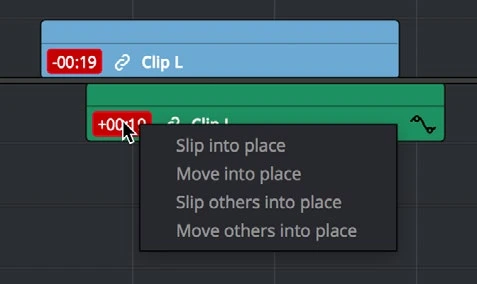
Constant offset and progressive drift are different problems. Measure the error at multiple points before moving clips or changing speed.
ACTUAL RESOLVE INTERFACEView full size ↗
Step by step
- Find a clear sync event near the beginning and another near the end. Note whether the mismatch stays constant or increases over time.
- For a constant offset, align the correct source event and verify the rest of the take. Check whether an earlier independent trim caused the slip.
- For progressive drift, inspect source frame-rate behavior, clip interpretation, recorder settings, and any retiming applied in the timeline.
- Test a constant-frame-rate transcode for problematic variable-frame-rate video, or a carefully measured audio timing correction on a duplicate. Recheck beginning, middle, and end.
Check your result
Picture and sound align at several widely separated points without introducing audible artifacts.
← PREVIOUS GUIDEFix dialogue playing in only one earNEXT GUIDE →Troubleshoot a render that fails at the same point
Technical reference: DaVinci Resolve 21.1 Reference Manual, Blackmagic Design, September 2026. Screenshot page numbers refer to that manual. Independently written guidance; specific controls may vary by platform and build. Authorship & image credits.