← All 100 how-to guidesGUIDE 049 / 100
AUDIO & DIALOGUE
How to duck music underneath dialogue
DaVinci Resolve Studio 21.1 · Original practical guide
Ducking lowers music while someone speaks. The control should respond to the dialogue source and recover smoothly during meaningful pauses.
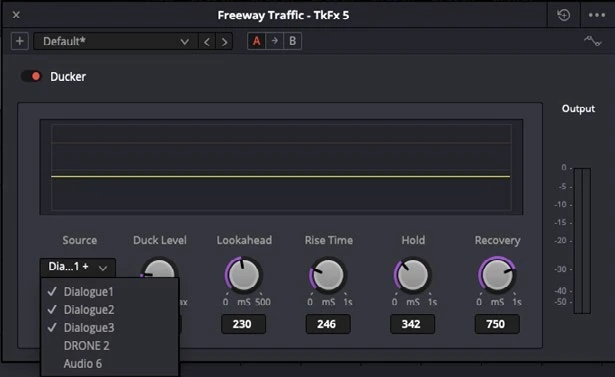
ACTUAL RESOLVE INTERFACEView full size ↗
Step by step
- Put dialogue and music on separate tracks and set a sensible music level before adding automatic ducking.
- In the music track’s Fairlight processing controls, enable Ducker and select the dialogue track or tracks as its detection source.
- Adjust reduction and timing while playing complete sentences. Aim for clear speech without obvious pumping between every word.
- Listen across pauses and the end of the scene. Use manual volume automation where automatic recovery does not follow the dramatic intent.
Check your result
Music steps back under speech and returns smoothly without distracting level swings.
Technical reference: DaVinci Resolve 21.1 Reference Manual, Blackmagic Design, September 2026. Screenshot page numbers refer to that manual. Independently written guidance; specific controls may vary by platform and build. Authorship & image credits.