← All 100 how-to guidesGUIDE 047 / 100
AUDIO & DIALOGUE
How to sync external audio using waveforms
DaVinci Resolve Studio 21.1 · Original practical guide
Waveform synchronization compares sound shared by the camera and external recorder. It works best when both recordings contain a clear, overlapping reference.
ACTUAL RESOLVE INTERFACEView full size ↗
Step by step
- Import the camera clip and external recording into the Media Pool. Preview them to confirm both contain the same event.
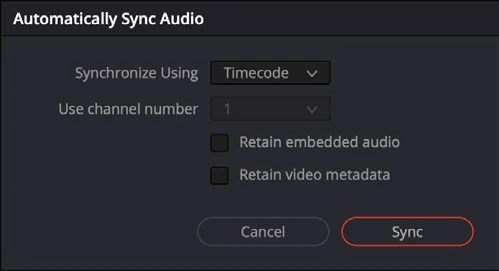
- Put the matching recordings in a dedicated bin, right-click the bin, and choose Auto Sync Audio. In Synchronize Using, select Waveform.
- Enable Retain embedded audio when you want the camera reference preserved alongside the synced recorder channels. Choose a useful analysis channel, then click Sync.
- Place the synced source in a timeline and inspect a clap or clear consonant near the beginning and end. Listen for echo from accidentally doubled audio.
Check your result
Picture and external sound align at multiple points, and only the intended microphone reaches the mix.
← PREVIOUS GUIDEReduce background noise with Voice IsolationNEXT GUIDE →Fix no sound during playback
Technical reference: DaVinci Resolve 21.1 Reference Manual, Blackmagic Design, September 2026. Screenshot page numbers refer to that manual. Independently written guidance; specific controls may vary by platform and build. Authorship & image credits.