← All 100 how-to guidesGUIDE 055 / 100
COLOR FOUNDATIONS
How to read waveform and RGB parade scopes
DaVinci Resolve Studio 21.1 · Original practical guide
Scopes measure image signals independently of how bright your room or monitor feels. Use them alongside the picture, not as a rule that every shot must resemble the same graph.
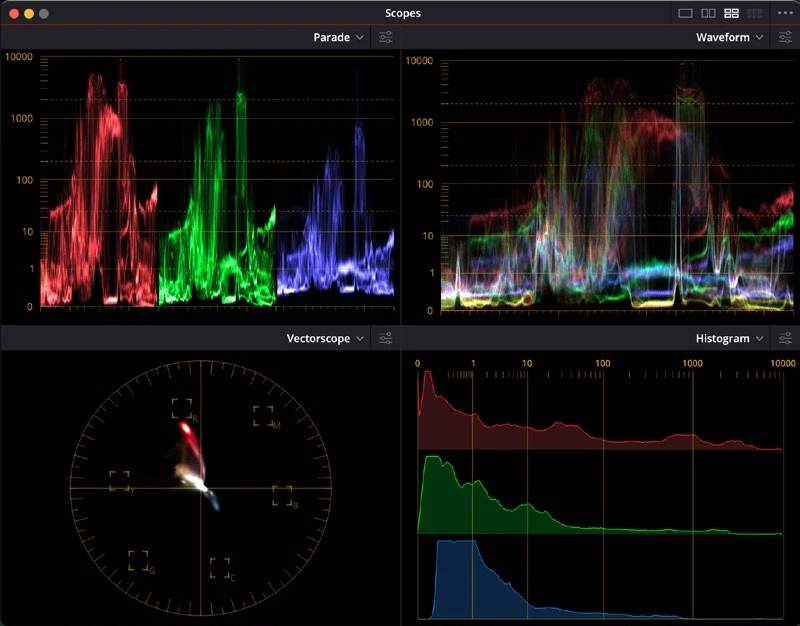
ACTUAL RESOLVE INTERFACEView full size ↗
Step by step
- Open the scopes on Color and choose Waveform to see brightness distributed across the frame.
- Identify a bright object and a shadow in the viewer, then relate their positions to the trace. Watch how an exposure change moves the signal.
- Switch to RGB Parade to compare channel behavior in areas expected to be neutral. Look for a broad color imbalance rather than forcing all peaks to match.
- Toggle the grade and examine whether the measurement changes support the visible correction. Check the scale and delivery range before judging legal limits.
Check your result
You can connect a visible image region with its scope trace and explain what your adjustment changed.
Technical reference: DaVinci Resolve 21.1 Reference Manual, Blackmagic Design, September 2026. Screenshot page numbers refer to that manual. Independently written guidance; specific controls may vary by platform and build. Authorship & image credits.